Last Updated on 09 Nov 2026
Batch CV Screening in Manatal From Job Description to Excel
Share in

Introduction
For batch CV screening in Manatal, open the CrossClassify Chrome side panel, choose the job description and run a review of the visible candidates. The panel shows where each CV supports the role and which claims may need a closer look. Export the results to Excel to share the review with your hiring team.
Request a Manatal batch screening demo
A recruiter reviewing ten applications for a software engineering role can see names and current positions on the Manatal Candidates page. Those fields are useful for finding the right records. They give a limited view of what applicants have done. A data analyst may have built production Python tools, while someone with a software engineer title may have spent most of their time on a different stack. The original CV gives the recruiter more to work with.
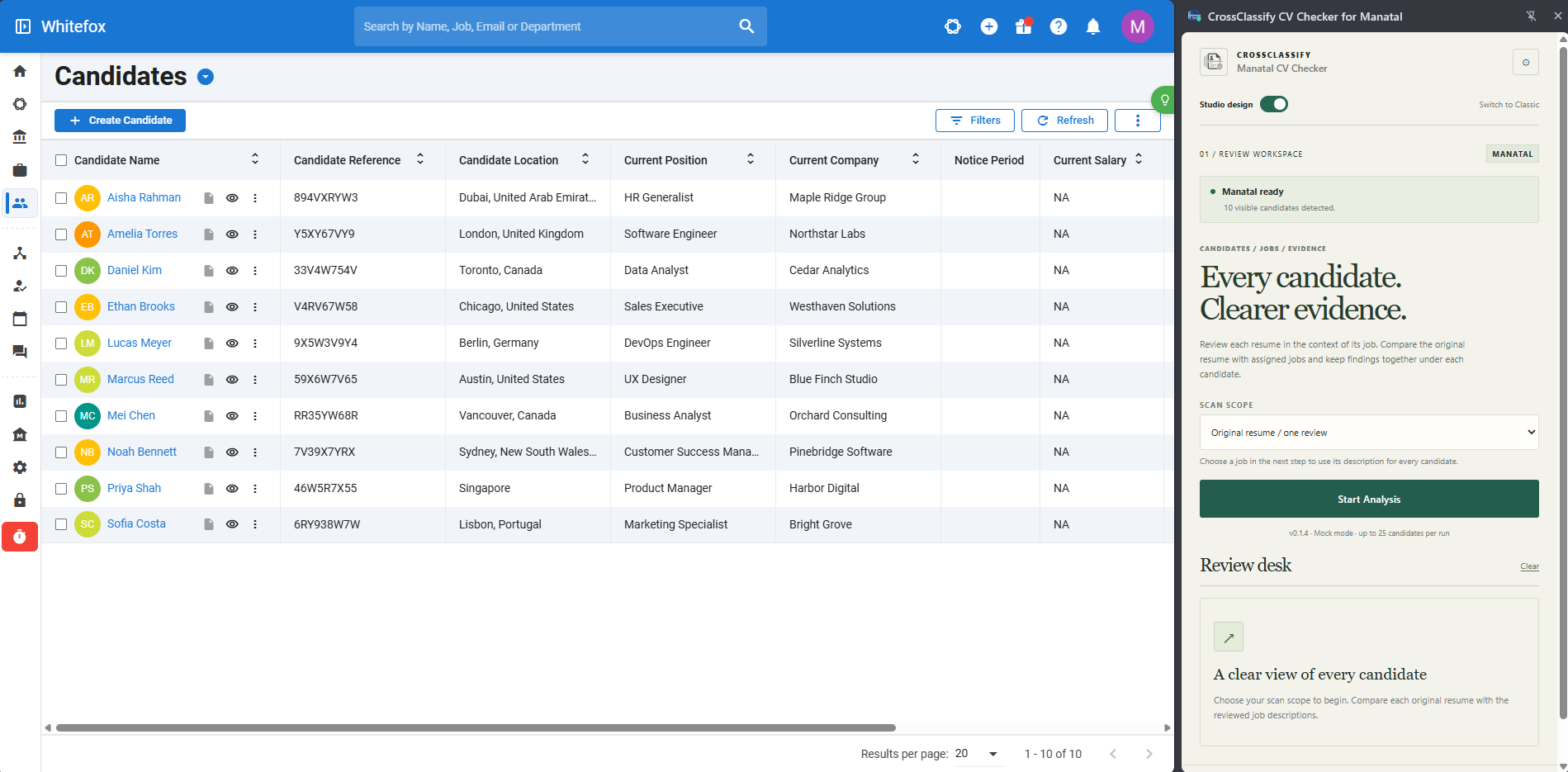
The challenge is keeping the same standard across the batch. One reviewer may focus on the technologies named in the CV, while another looks for what the person actually built or maintained. The CrossClassify Chrome side panel puts the document review beside the Manatal candidate list and records the job used for each comparison. Recruiters can start from the same description, inspect the evidence and give the hiring manager a workbook they can trace back to the original CV. Explore the CrossClassify CV Checker
Where Manatal’s own tools fit
Manatal’s candidate profile brings together skills, employment history and other applicant information. Its Resume tab gives recruiters access to the original uploaded document when one is available. Manatal also documents AI Candidate Recommendations, which can surface and rank candidates from the database against a job. If your immediate task is to find candidates across the database, start there. If you already have a group of applications to screen, the CrossClassify workflow starts with the CVs on the candidate page you intend to review. Manatal candidate profiles · Manatal AI Candidate Recommendations
Set up a batch around the right job description
Confirm the list and its scope
Open Manatal’s Candidates page, apply the filters relevant to the vacancy and open the Chrome side panel. Check the candidate count before you proceed. A filtered list can span several pages, and the count in the side panel refers to the visible candidates. In the demo build shown here, the panel displays a limit of 25 candidates per run. If your list spans pages, keep track of the pages you review so you can distinguish a completed page from a completed shortlist.
Decide how to apply the job description
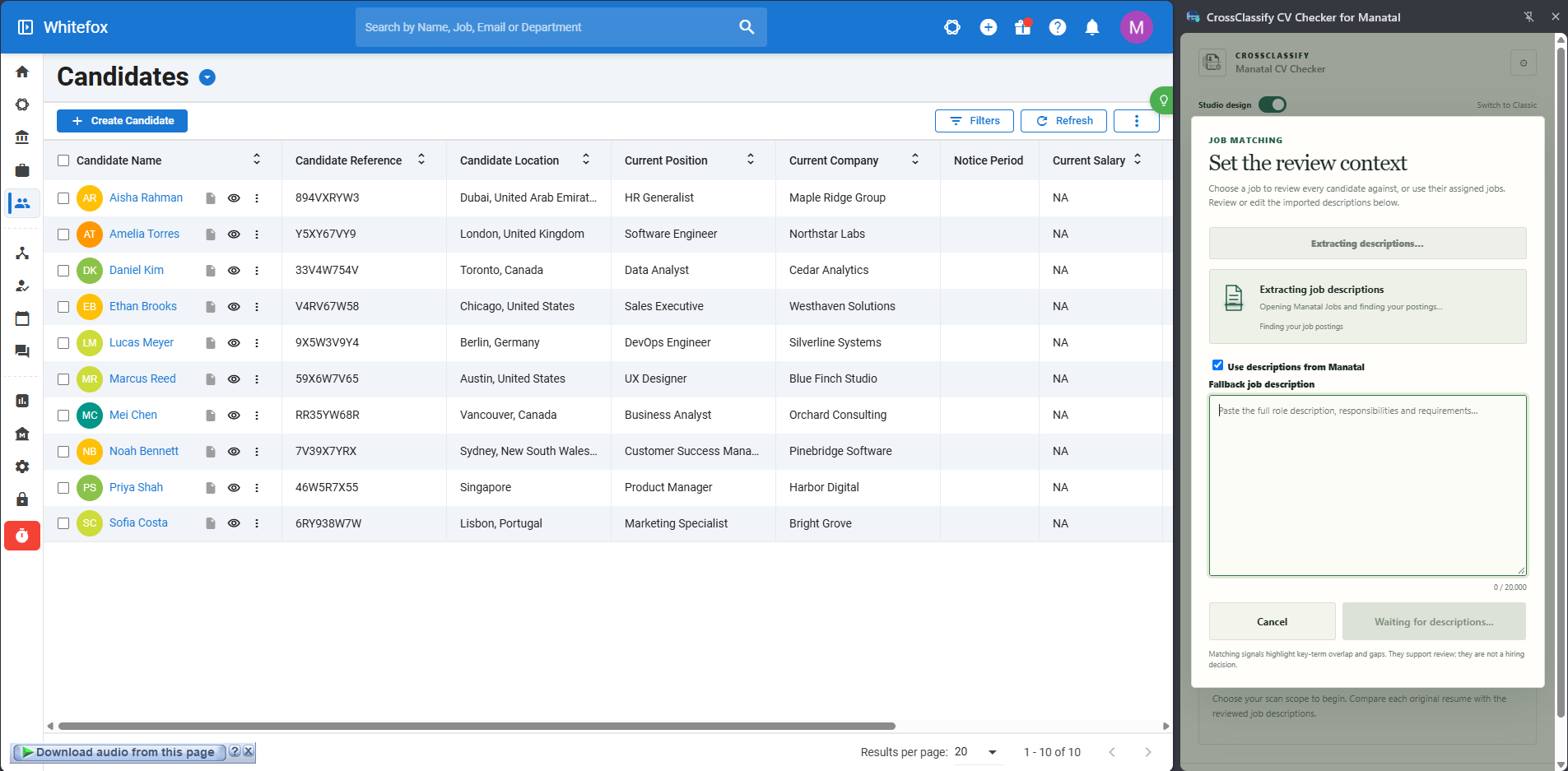
Use a single selected job description when everyone in the batch is being considered for the same opening. For a mixed list, the setup offers an assigned-job option so you can review applications in the context of their own vacancies. Before starting, confirm that the assigned roles reflect the applications you want to review. Otherwise, two results can look comparable on the screen even though they answer different questions.
Read the imported descriptions before using them. The setup lets recruiters review or edit the descriptions it pulls from Manatal and provides a field for a fallback description. Use the approved role description where available. If it says “experience with databases,” clarify what the hiring team actually needs. A person who maintained PostgreSQL in production can show different evidence from someone who used SQL in a reporting class. If either experience meets the requirement, make that clear before you screen the batch.
Run the review and inspect the first results
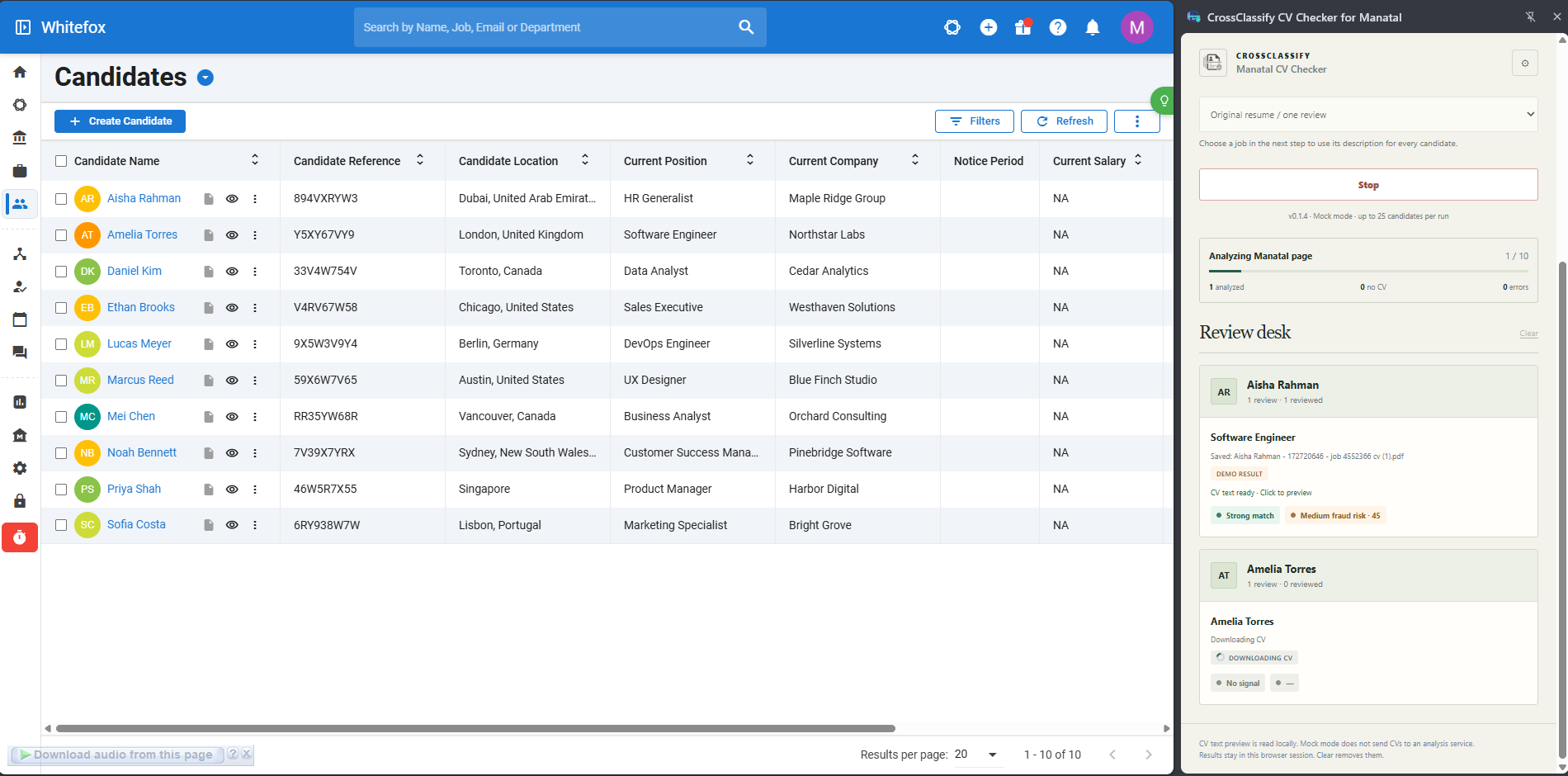
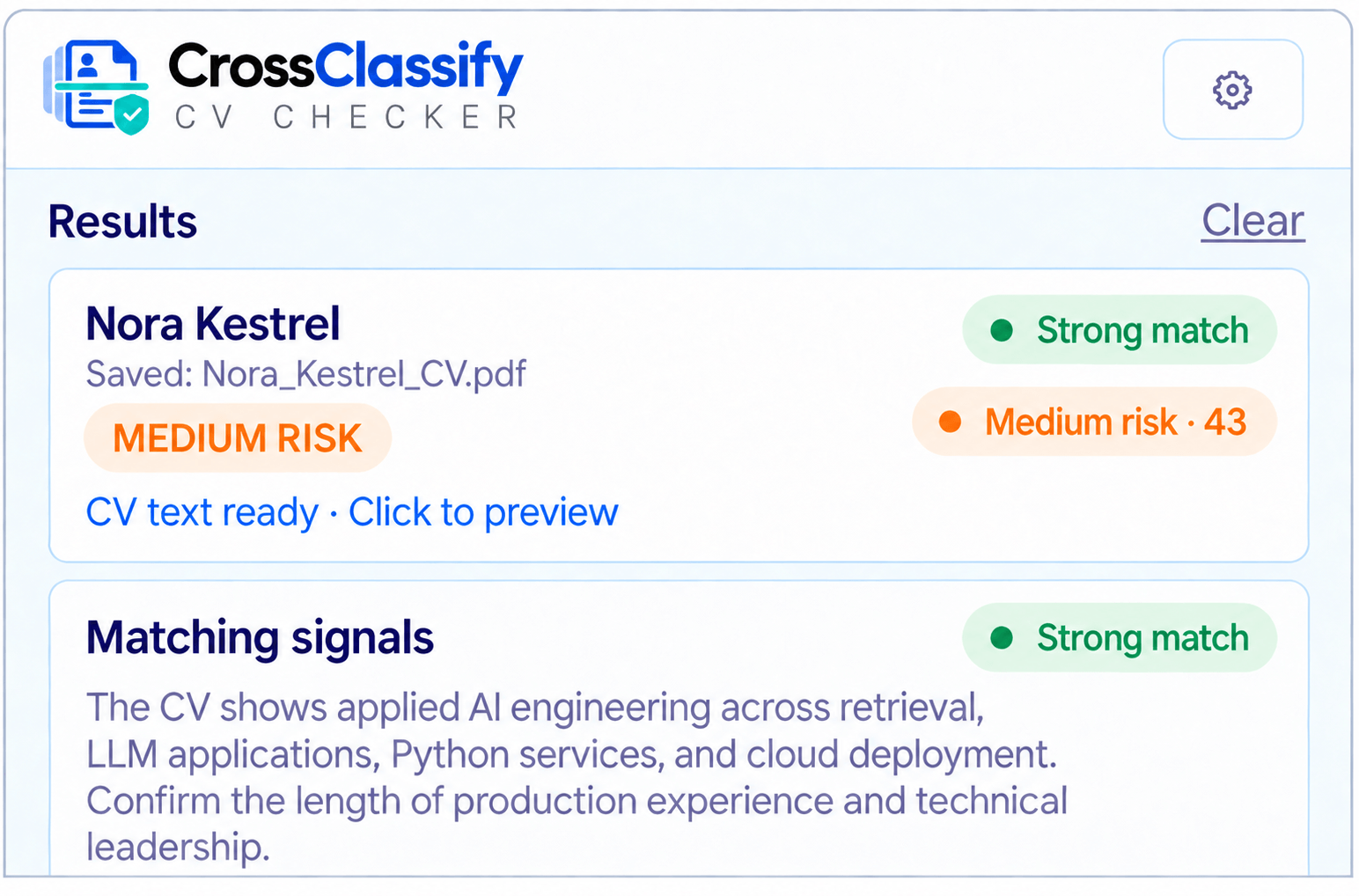
Once the batch starts, the panel shows progress and tracks candidates without a CV and errors separately. Review cards appear as candidates are processed. In the example below, one review is available while the next CV is being downloaded. Use the first completed result to confirm that the run is using the role and document you expected. If you spot the wrong job description, stop the run and correct the setup before reviewing the rest.
Read match signals against the original document
Start with a requirement that can change the next hiring step. Suppose the role calls for Python automation and experience supporting a production database. A CV might show that the applicant automated incident reports with Python and omit the database they used. The first signal gives you a project to discuss. The second gives you a question to resolve, such as which database supported the project and what the applicant personally maintained. Read the project description before deciding that the evidence is insufficient. CrossClassify’s guide to job description match signals
The review card also shows a separate CV risk result. Treat it as a prompt to check a particular claim or discrepancy. A match signal about missing PostgreSQL evidence tells you something about the application’s fit for the role. A CV risk signal about conflicting dates calls for a different follow-up. The screenshots in this article use sample candidate records and mock results to show the interface. CrossClassify’s guide to reviewing CV risk
Resolve missing documents and errors separately
If a row shows no CV, open the Manatal profile and check whether an original document is accessible. If a row shows an error or the run stops before it reaches a candidate, record the outstanding review and revisit it before treating the batch as complete. When several versions are available, confirm which original the result refers to before using it in a hiring discussion. Manatal’s guide to original resumes · Manatal’s guide to resume versions
Turn the Excel export into a review handoff
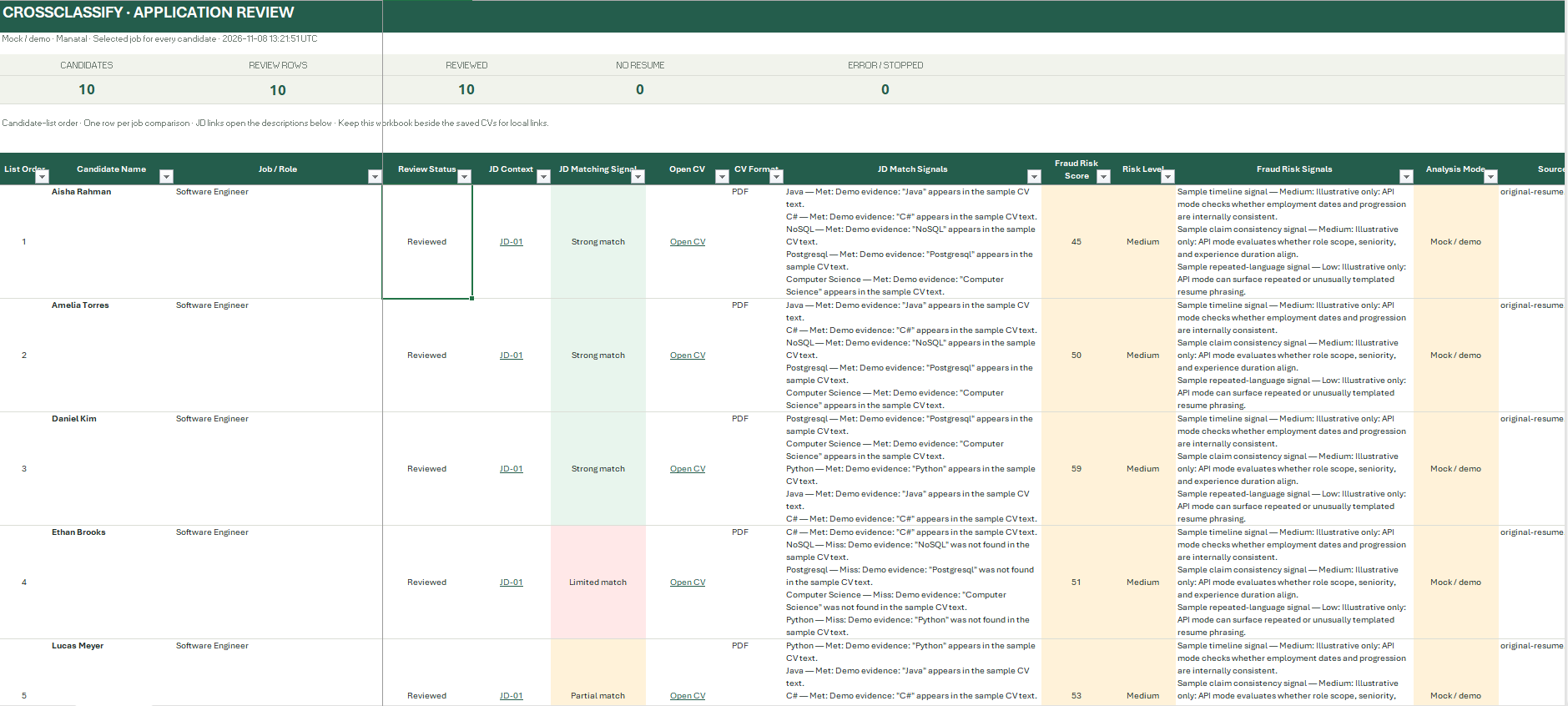
The Application Review workbook puts one job comparison on each row. It includes the review status, the job or role, a link to the job description used, the job match signals, CV risk fields and an Open CV link. If a candidate was compared with more than one job, check the role and the job context before interpreting either row. Keep the workbook beside the saved CVs if your team needs its local document links, and test the links where the recipient will open them.
Reconcile the workbook before sharing it
Start with the counts. In the sample workflow, Manatal shows ten visible candidates and the workbook records ten reviewed rows for the same selected job. In a live review, the number of candidate records and job comparison rows can differ. Reconcile how many people were in scope, how many comparisons were intended and how many need follow-up. If nine out of ten candidates were reviewed and one had no CV, share those as separate counts and give someone responsibility for checking the missing document.
Next, spot-check two or three rows against the original files. Confirm the candidate, the role and at least one material signal in each row. When you hand the workbook to a hiring manager, add the next question in your team’s usual notes. A useful example is “Ask which database supported the Python reporting tool and whether the candidate owned schema changes.” The workbook gives the manager the document and job context to prepare for that conversation.
What to test in a first pilot
Use a small group of sample candidates and a job description your recruiters know well. Include a CV with clear evidence for a key requirement, a CV with adjacent experience and a profile with no accessible document. Have a recruiter work through the batch and ask a second reviewer to use the handoff without watching the run. The handoff is ready to use when the second reviewer can identify the role, open the right CV and explain what should happen next for each test case.
If you compare the pilot with your current process, record the time spent preparing the batch, reading results and clearing exceptions. Count how many rows needed manual follow-up and check whether that work was clear in the handoff. These measures show where the workflow helps your team and where a person still needs to check a source document or clarify a role requirement.
Request a CrossClassify walkthrough for your Manatal screening workflow.
Review More CVs Without Repeating the Same Comparison
Use structured positive and negative match signals to move through candidate reviews with less repetitive comparison.
Explore CrossClassify today
Detect and prevent fraud in real time
Protect your accounts with AI-driven security
Try CrossClassify for FREE—3 months
Share in
Related articles



Frequently asked questions
Let's Get Started
Create your free
account today
Discover how to secure your app against fraud using CrossClassify
No credit card required